
|
Plexis Point of Sale Software
|
No Internet POS Software
Plexis POS Software Free Trial Offer Keep your own Credit Card Company Use in Your Business 45 days FREE! |
|
|
SETTING UP YOUR ZEBRA ZD411 BARCODE PRINTER |
Driver Settings
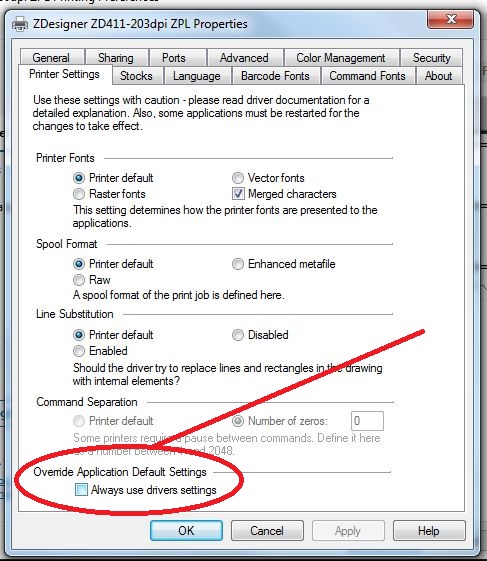
(click for larger image) DRIVER: Zebra ZDesigner ZD411-203dpi ZPL 32bit Package (33mb download here) |
Plexis POS supports Zebra ZD411-203 dpi printers. It is important to install
the proper Windows Driver package for these printers to operate correctly. |
Testing printer with the Plexis POS Diagnostic
Load a 2.00 Wide x 1.0 High Barcode Label roll into the printer.
During the test choose 2.00 Wide x 1.0 High Barcode Label. 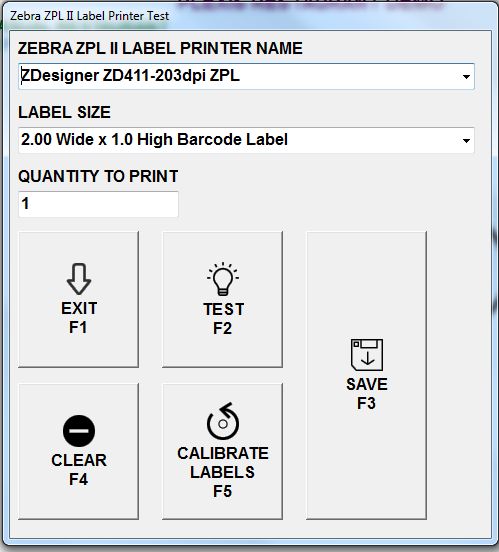
(click for larger image) |
|
Demo Download Price List Features Screen Samples |
Restaurant POS Software | Pizza POS Software | Coffee Shop POS Software
Grocery Store POS Software | Convenience Store POS Software Retail POS Software | Liquor Store POS Software Cafe and Deli POS Software | EBT / Snap and Food Stamp POS Software |
Our 30 Day Refund Policy About us Contact us Privacy Policy |