
|
Plexis Point of Sale Software
|
No Internet POS Software
Plexis POS Software Free Trial Offer Keep your own Credit Card Company Use in Your Business 45 days FREE! |
|
|
PLEXIS POS PAX PIN PAD TERMINAL SETUP |
|
Plexis POS fully integrates Credit Card and Debit Card and EBT / SNAP Food Stamps. |
|
Obtain your Credit Processing equipment from your Merchant Services Provider. We do not provide Pin Pad Payment Terminals or any other hardware and supplies. |
|
Notice to Processors: DO NOT enable Partial Authorizations Partial Debit Authorizations are NOT Supported |
|
PAX Pin Pad Terminal Internal Settings (example IP settings, yours may vary) It is absolutely imperative that you set HTTP GET as the protocol (cell 13) |
This example is for information purposes only
and is only an example of what you might see. |
||||||||||||||||||||||||||||||||||||||||||||||
|
Perform an Initialize Terminal command using the PAX Diagnostic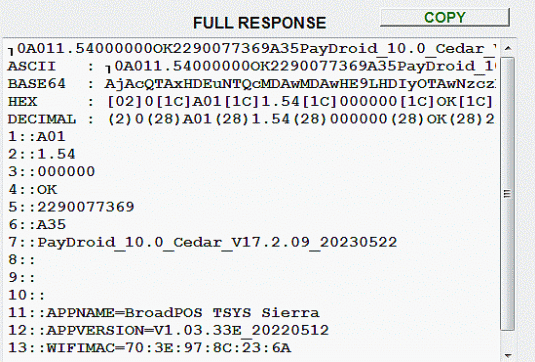
If you see this type information the terminal is communicating with our software properly. We have tested this terminal model using PAX Base v1.54 released by the manufacturer. Other PAX base versions may work as well but we do not guarantee or support them. |
|
The setup mode for Pax terminals is now controlled exclusively in the PAX Store. This PAX Store is a web Based application available only to your processor, ISO or authorized users. Contact your supplier for assistance in setting up your Pin-Pad terminals as we do not have access to the PAX Store or configuration settings. We cannot assist you with the internal settings of pin-pad terminals. |
|
PAX TERMINAL COMM ERROR 100010 If you get this error when processing a card and you are certain all other settings are correct there is a good chance your router is blocking the Terminal IP address and port. Configure your router to allow access to the terminal as described below. Router / Firewall Settings : If you are connecting your PAX terminal through a router you will need to set Port Forwarding up for EACH terminal IP and Port connected to the router. |
Port Forwarding Example :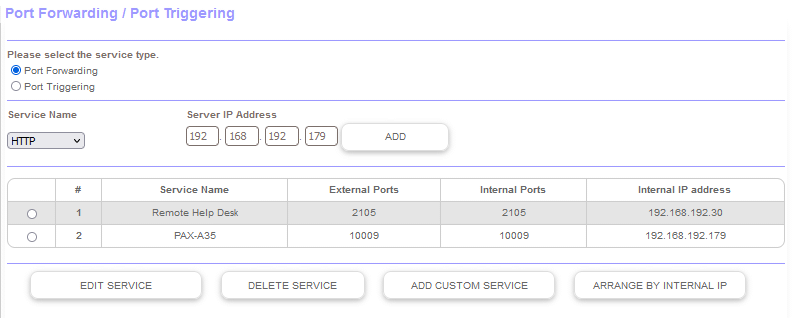
Click image for details |
|
Demo Download Price List Features Screen Samples |
Restaurant POS Software | Pizza POS Software | Coffee Shop POS Software
Grocery Store POS Software | Convenience Store POS Software Retail POS Software | Liquor Store POS Software Cafe and Deli POS Software | EBT / Snap and Food Stamp POS Software |
Our 30 Day Refund Policy About us Contact us Privacy Policy |